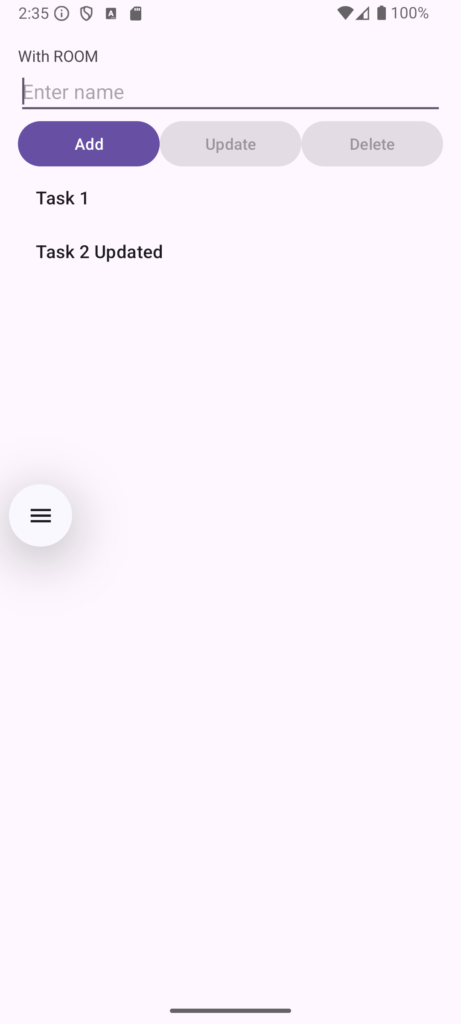
Building a CRUD App with RecyclerView, Room, and Fragment
In this tutorial, we will build a complete CRUD (Create, Read, Update, Delete) application in Android. We will use a Fragment to manage our User Interface, RecyclerView to display a list of names, and Room Database to store those names locally.
Step 1: Add Dependencies (build.gradle)
First, add the Room dependencies to your module-level build.gradle file inside the dependencies block.
dependencies {
    def room_version = "2.6.1"

    implementation "androidx.room:room-runtime:$room_version"
    annotationProcessor "androidx.room:room-compiler:$room_version"

    implementation libs.appcompat
    implementation libs.material
    implementation libs.activity
    implementation libs.constraintlayout
    testImplementation libs.junit
    androidTestImplementation libs.ext.junit
    androidTestImplementation libs.espresso.core
}
Step 2: Define the Data Model (Entity)
Create a class named Name.java. This acts as our database table. We use the @Entity annotation to define the table name and @PrimaryKey for our auto-generating ID.
package com.example.week5recyclerviewroom;

import androidx.room.Entity;
import androidx.room.PrimaryKey;

@Entity(tableName = "names")
public class Name {
    @PrimaryKey(autoGenerate = true)
    private int id;
    private String nameText;

    public Name(String nameText) {
        this.nameText = nameText;
    }

    public int getId() { return id; }
    public void setId(int id) { this.id = id; }

    public String getNameText() { return nameText; }
    public void setNameText(String nameText) { this.nameText = nameText; }
}
Step 3: Create the Data Access Object (DAO)
The NameDao.java interface defines our database operations (Insert, Read, Update, Delete).
package com.example.week5recyclerviewroom;

import androidx.room.Dao;
import androidx.room.Delete;
import androidx.room.Insert;
import androidx.room.Query;
import androidx.room.Update;
import java.util.List;

@Dao
public interface NameDao {

    @Insert
    void insert(Name name);

    @Query("SELECT * FROM names")
    List<Name> getAllNames();

    @Update
    void update(Name name);

    @Delete
    void delete(Name name);
}
Step 4: Build the Room Database
Create AppDatabase.java to serve as the main access point for your connection to the app’s persisted data.
package com.example.week5recyclerviewroom;

import androidx.room.Database;
import androidx.room.RoomDatabase;

@Database(entities = {Name.class}, version = 1)
public abstract class AppDatabase extends RoomDatabase {
    public abstract NameDao nameDao();
}
Step 5: Create the Layouts
1. Main Activity Layout (activity_main.xml)
This layout acts as an empty container for our Fragment.
<?xml version="1.0" encoding="utf-8"?>
<androidx.constraintlayout.widget.ConstraintLayout xmlns:android="http://schemas.android.com/apk/res/android"
    xmlns:app="http://schemas.android.com/apk/res-auto"
    xmlns:tools="http://schemas.android.com/tools"
    android:id="@+id/main"
    android:layout_width="match_parent"
    android:layout_height="match_parent"
    tools:context=".MainActivity">

</androidx.constraintlayout.widget.ConstraintLayout>
2. Fragment Layout (fragment_name_list.xml)
This holds the input field, the Add/Update/Delete buttons, and the RecyclerView.
<?xml version="1.0" encoding="utf-8"?>
<LinearLayout xmlns:android="http://schemas.android.com/apk/res/android"
    android:layout_width="match_parent"
    android:layout_height="match_parent"
    android:orientation="vertical"
    android:padding="16dp">

    <TextView
        android:layout_width="wrap_content"
        android:layout_height="wrap_content"
        android:text="With ROOM"/>

    <EditText
        android:id="@+id/nameInput"
        android:layout_width="match_parent"
        android:layout_height="wrap_content"
        android:hint="Enter name" />

    <LinearLayout
        android:layout_width="match_parent"
        android:layout_height="wrap_content"
        android:orientation="horizontal">

        <Button
            android:id="@+id/addButton"
            android:layout_width="0dp"
            android:layout_weight="1"
            android:layout_height="wrap_content"
            android:text="Add" />

        <Button
            android:id="@+id/updateButton"
            android:layout_width="0dp"
            android:layout_weight="1"
            android:layout_height="wrap_content"
            android:text="Update" />

        <Button
            android:id="@+id/deleteButton"
            android:layout_width="0dp"
            android:layout_weight="1"
            android:layout_height="wrap_content"
            android:text="Delete" />
    </LinearLayout>

    <androidx.recyclerview.widget.RecyclerView
        android:id="@+id/recyclerView"
        android:layout_width="match_parent"
        android:layout_height="0dp"
        android:layout_weight="1" />
</LinearLayout>
Step 6: Build the RecyclerView Adapter
Create NameAdapter.java. Notice how we pass the Fragment into the adapter constructor so we can handle click events on the list items directly inside the Fragment.
package com.example.week5recyclerviewroom;

import android.view.LayoutInflater;
import android.view.View;
import android.view.ViewGroup;
import android.widget.TextView;
import androidx.annotation.NonNull;
import androidx.recyclerview.widget.RecyclerView;
import java.util.List;

public class NameAdapter extends RecyclerView.Adapter<NameAdapter.NameViewHolder> {
    private List<Name> nameList;
    private NameListFragment fragment;

    public NameAdapter(List<Name> nameList, NameListFragment fragment) {
        this.nameList = nameList;
        this.fragment = fragment;
    }

    @NonNull
    @Override
    public NameAdapter.NameViewHolder onCreateViewHolder(@NonNull ViewGroup parent, int viewType) {
        View view = LayoutInflater.from(parent.getContext())
                .inflate(android.R.layout.simple_list_item_1, parent, false);
        return new NameViewHolder(view);
    }

    @Override
    public void onBindViewHolder(@NonNull NameAdapter.NameViewHolder holder, int position) {
        Name name = nameList.get(position);
        holder.textView.setText(name.getNameText());
        holder.itemView.setOnClickListener(v -> {
            fragment.onItemClicked(name);
        });
    }

    @Override
    public int getItemCount() {
        return nameList.size();
    }

    public void updateList(List<Name> newList){
        nameList = newList;
        notifyDataSetChanged();
    }

    public class NameViewHolder extends RecyclerView.ViewHolder{
        TextView textView;
        public NameViewHolder(@NonNull View itemView) {
            super(itemView);
            textView = itemView.findViewById(android.R.id.text1);
        }
    }
}
Step 7: Implement the Fragment Logic
Create NameListFragment.java. This connects our UI buttons to our Room database DAO methods.
.allowMainThreadQueries() to build the database for simplicity and demonstration purposes. In a production app, database queries should run on a background thread.
package com.example.week5recyclerviewroom;

import android.os.Bundle;
import androidx.fragment.app.Fragment;
import androidx.recyclerview.widget.LinearLayoutManager;
import androidx.recyclerview.widget.RecyclerView;
import androidx.room.Room;
import android.view.LayoutInflater;
import android.view.View;
import android.view.ViewGroup;
import android.widget.Button;
import android.widget.EditText;
import java.util.ArrayList;
import java.util.List;

public class NameListFragment extends Fragment {

    private RecyclerView recyclerView;
    private NameAdapter adapter;
    private List<Name> nameList;
    private AppDatabase db;
    private EditText nameInput;
    private Button addButton, updateButton, deleteButton;
    private Name selectedName;

    @Override
    public View onCreateView(LayoutInflater inflater, ViewGroup container,
                             Bundle savedInstanceState) {
        View view = inflater.inflate(R.layout.fragment_name_list, container, false);
        recyclerView = view.findViewById(R.id.recyclerView);
        nameInput = view.findViewById(R.id.nameInput);
        addButton = view.findViewById(R.id.addButton);
        updateButton = view.findViewById(R.id.updateButton);
        deleteButton = view.findViewById(R.id.deleteButton);

        nameList = new ArrayList<>();
        adapter = new NameAdapter(nameList, this);
        recyclerView.setLayoutManager(new LinearLayoutManager(getContext()));
        recyclerView.setAdapter(adapter);

        db = Room.databaseBuilder(getContext(), AppDatabase.class, "name-database").allowMainThreadQueries().build();
        loadNames();

        addButton.setOnClickListener(v -> {
            String name = nameInput.getText().toString();
            if (!name.isEmpty()) {
                if (selectedName == null) { // Add new name
                    db.nameDao().insert(new Name(name));
                    nameInput.setText("");
                    loadNames();
                } else { // Cancel editing
                    selectedName = null;
                    nameInput.setText("");
                    updateButton.setEnabled(false);
                    deleteButton.setEnabled(false);
                    addButton.setText("Add");
                }
            }
        });

        updateButton.setOnClickListener(v -> {
            if (selectedName != null) {
                String newName = nameInput.getText().toString();
                if (!newName.isEmpty()) {
                    selectedName.setNameText(newName);
                    db.nameDao().update(selectedName);
                    nameInput.setText("");
                    selectedName = null;
                    updateButton.setEnabled(false);
                    deleteButton.setEnabled(false);
                    addButton.setText("Add");
                    loadNames();
                }
            }
        });

        deleteButton.setOnClickListener(v -> {
            if (selectedName != null) {
                db.nameDao().delete(selectedName);
                nameInput.setText("");
                selectedName = null;
                updateButton.setEnabled(false);
                deleteButton.setEnabled(false);
                addButton.setText("Add");
                loadNames();
            }
        });

        updateButton.setEnabled(false);
        deleteButton.setEnabled(false);

        return view;
    }

    private void loadNames() {
        nameList = db.nameDao().getAllNames();
        adapter.updateList(nameList);
    }

    public void onItemClicked(Name name) {
        selectedName = name;
        nameInput.setText(name.getNameText());
        updateButton.setEnabled(true);
        deleteButton.setEnabled(true);
        addButton.setText("Cancel");
    }
}
Step 8: Set Up the MainActivity
Finally, update MainActivity.java to load our NameListFragment into the main layout when the app starts.
package com.example.week5recyclerviewroom;

import android.os.Bundle;
import androidx.activity.EdgeToEdge;
import androidx.appcompat.app.AppCompatActivity;
import androidx.core.graphics.Insets;
import androidx.core.view.ViewCompat;
import androidx.core.view.WindowInsetsCompat;

public class MainActivity extends AppCompatActivity {

    @Override
    protected void onCreate(Bundle savedInstanceState) {
        super.onCreate(savedInstanceState);
        EdgeToEdge.enable(this);
        setContentView(R.layout.activity_main);

        ViewCompat.setOnApplyWindowInsetsListener(findViewById(R.id.main), (v, insets) -> {
            Insets systemBars = insets.getInsets(WindowInsetsCompat.Type.systemBars());
            v.setPadding(systemBars.left, systemBars.top, systemBars.right, systemBars.bottom);
            return insets;
        });

        // Load the fragment
        getSupportFragmentManager().beginTransaction()
                .replace(R.id.main, NameListFragment.class, null)
                .commit();
    }
}