Storing small bits of data shouldn’t require a full database. SharedPreferences allows you to persist key-value pairs easily. Whether it’s a user’s high score or a “Dark Mode” toggle, this API has been the backbone of Android persistence for years.
Try the Simulator
Click the buttons to see the UI update instantly, then watch apply() write the data to the Disk Storage in the background.
Android UI
0
Current Counter
Disk Storage (.xml)
high_score: Empty
high_score: Empty
Step-by-Step Implementation
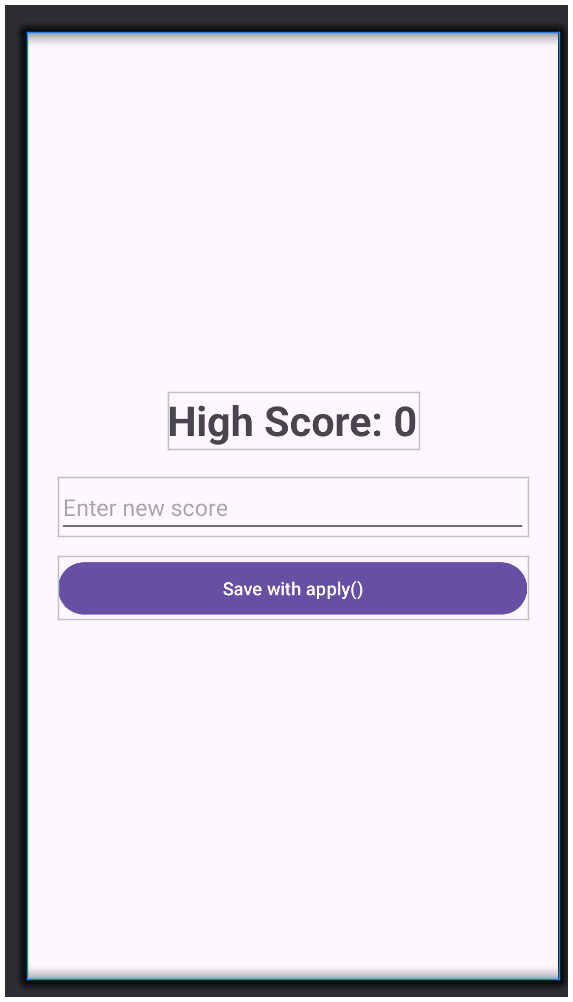
Ready to build it? Follow these two files to create your own persistent high-score app.
XML res/layout/activity_main.xml
<LinearLayout
    xmlns:android="http://schemas.android.com/apk/res/android"
    android:layout_width="match_parent"
    android:layout_height="match_parent"
    android:orientation="vertical"
    android:gravity="center"
    android:padding="24dp">

    <TextView
        android:id="@+id/scoreDisplay"
        android:layout_width="wrap_content"
        android:layout_height="wrap_content"
        android:text="High Score: 0"
        android:textSize="32sp"
        android:textStyle="bold" />

    <EditText
        android:id="@+id/scoreInput"
        android:layout_width="match_parent"
        android:layout_height="wrap_content"
        android:hint="Enter new score"
        android:inputType="number"
        android:layout_marginTop="20dp" />

    <Button
        android:id="@+id/saveButton"
        android:layout_width="match_parent"
        android:layout_height="wrap_content"
        android:layout_marginTop="16dp"
        android:text="Save with apply()" />

</LinearLayout>
JAVA MainActivity.java
public class MainActivity extends AppCompatActivity {

    private static final String KEY_SCORE = "high_score";
    private SharedPreferences sharedPref;
    private TextView scoreDisplay;

    @Override
    protected void onCreate(Bundle savedInstanceState) {
        super.onCreate(savedInstanceState);
        setContentView(R.layout.activity_main);

        scoreDisplay = findViewById(R.id.scoreDisplay);
        EditText scoreInput = findViewById(R.id.scoreInput);
        Button saveButton = findViewById(R.id.saveButton);

        // Initialize: getPreferences is tied to this Activity only
        sharedPref = getPreferences(Context.MODE_PRIVATE);

        // 1. Read existing value
        int currentScore = sharedPref.getInt(KEY_SCORE, 0);
        scoreDisplay.setText("High Score: " + currentScore);

        // 2. Write new value
        saveButton.setOnClickListener(v -> {
            int newScore = Integer.parseInt(scoreInput.getText().toString());

            SharedPreferences.Editor editor = sharedPref.edit();
            editor.putInt(KEY_SCORE, newScore);
            editor.apply(); // Background save

            scoreDisplay.setText("High Score: " + newScore);
        });
    }
}