What is Expo?
- A free toolkit for building mobile apps with JavaScript and React
- One codebase gives you an iPhone app, an Android app and a web version
- Test on your own phone instantly with the Expo Go app
- Build and publish in the cloud with EAS, so you don’t need a Mac for iPhone apps
What you need
- Node.js (LTS): nodejs.org
- VS Code (code editor): code.visualstudio.com
- Expo Go app on your phone (App Store or Google Play)
- Later, to publish: a free Expo account, an Apple Developer account ($99/year) and a Google Play account ($25 once)
1. Create a project
Open a terminal in the folder where you keep projects:
npx create-expo-app@latest my-app
cd my-app
2. Start it
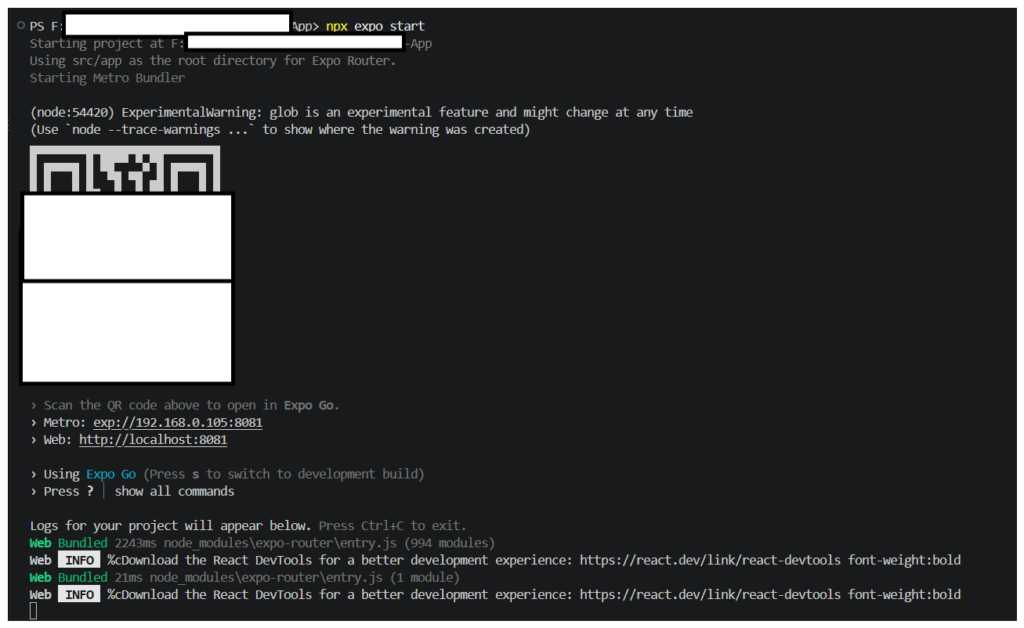
npx expo start- A QR code and a menu appear in the terminal
- Keep this terminal open while you work
- Windows firewall pop-up for Node.js: click Allow (Private networks)
3. See your app
| Where | How |
|---|---|
| Web browser | Press w in the terminal |
| Android phone | Open Expo Go, tap Scan QR code |
| iPhone | Point the Camera app at the QR code, tap the banner |
- Phone and computer must be on the same Wi-Fi
- Can’t connect? Stop with Ctrl+C and run
npx expo start --tunnel
4. Make changes
- Edit a file and save: the app updates on your phone in a second
- Shake the phone (or press m) for the developer menu
- Press r in the terminal to reload
Project folders
| File / folder | What it is |
|---|---|
app/ (or src/app/) | Your screens. Each file is one screen. |
app/_layout | Navigation: tabs, headers, stack |
assets/ | App icon, splash screen, images |
app.json | App name, version, icons, app IDs |
package.json | List of installed packages |
Add a package
# always use "expo install" so versions match your Expo SDK
npx expo install expo-audio
5. Build the real apps
npx eas-cli@latest login
npx eas-cli@latest build:configure

# test version for Android (gives an installable .apk link)
npx eas-cli@latest build --profile preview --platform android

# store versions for both platforms
npx eas-cli@latest build --platform all- Builds run in Expo’s cloud and take about 10 to 30 minutes
- The free plan includes a limited number of builds per month
6. Publish to the stores
npx eas-cli@latest submit --platform android
npx eas-cli@latest submit --platform ios
Before submitting, prepare:
- App icon and screenshots
- Short and full description
- Privacy policy page (a web link)
- Content or age rating questionnaire
7. Update your app later
- Small changes (text, design, bug fixes):
npx eas-cli@latest updatesends them to users without store review - Bigger changes (new native features, new Expo version): raise
versioninapp.json, then build and submit again
Common problems
- “Incompatible with this version of Expo Go”: your project’s Expo SDK is newer or older than the Expo Go app. Get the matching Expo Go from expo.dev/go, or make a development build.
- “Port 8081 is being used”: type Y to use another port
- “npx is not recognized”: reinstall Node.js, then restart the terminal
- Red error screen: read the first line, it usually names the file and line
That’s it: create, start, scan, edit, build, publish. Docs: docs.expo.dev